InfoskatersGet Started
Digital Menu for Restaurants

The Menu on the Table Updates When You Do

Guests scan a QR code, browse the live menu and order from their phone. You run dishes, waiters and table tickets from one restaurant panel.

Table QR Codes

Live Menu

Opens on Phone

Table Orders

Waiter Logins

Order Tracking

From the First Scan to Today’s Orders.

Restaurants, owners, live tickets and revenue stay on one screen for the people who run the floor.
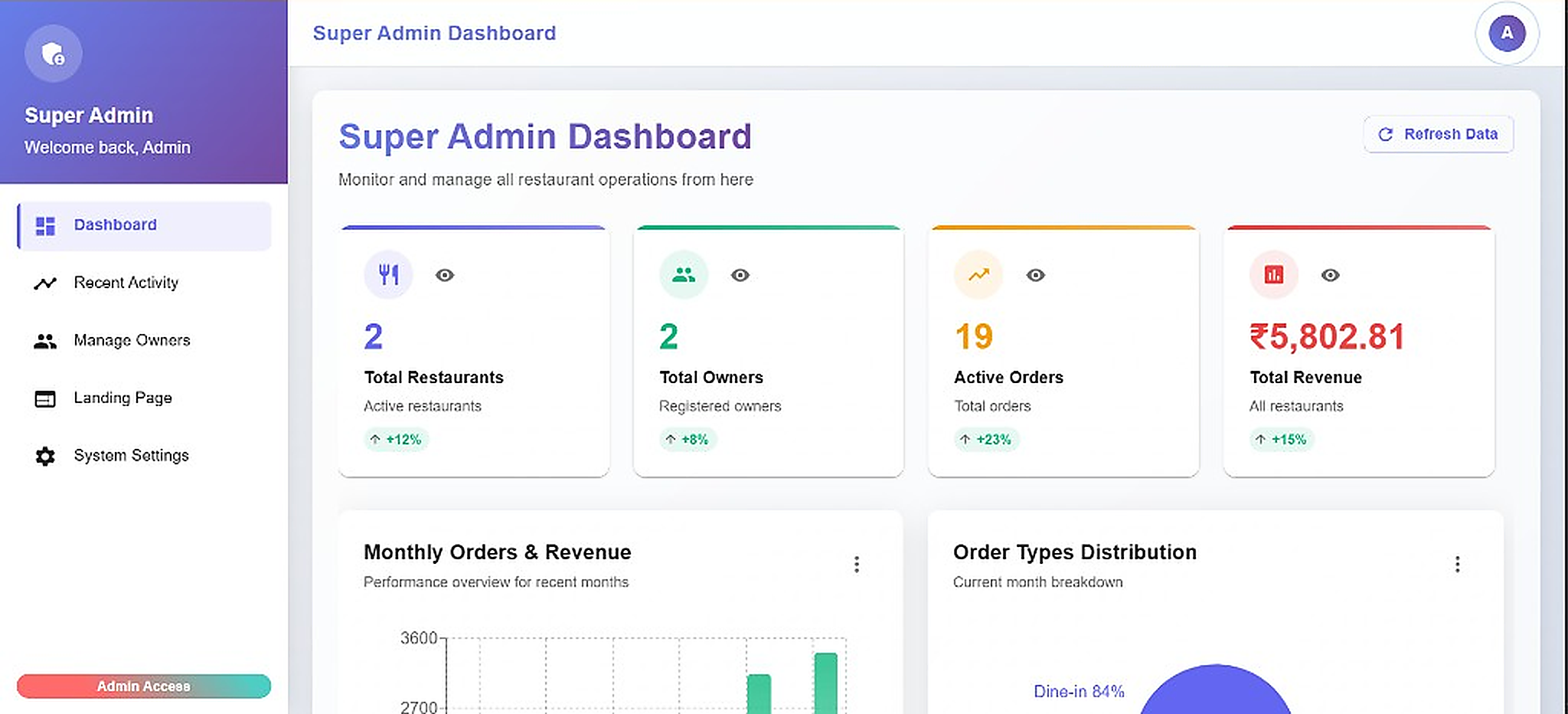
Restaurant panel showing total restaurants, owners, active orders and revenue

Every Restaurant

See how many kitchens are live and how many owners are on the panel.

Orders as They Come In

Active tickets and revenue sit on the same screen as the month’s chart.

Dine-in and Takeaway

Order types and monthly performance stay visible without opening another report.

Built for kitchens that change the board every service

RestaurantsCafesBarsCloud KitchensFood TrucksHotel Dining

A Printed Menu Is Out of Date Before the Ink Dries.

Printed menus are already wrong the week after you reprint them

A price change means calling the printer again

Guests wait for a paper menu while tables fill up

Waiters take orders on paper, then type them in later

You cannot see which tables have ordered and which have not

Specials and 86'd items stay on the card until someone notices

Guests have to install an app they will never open again

Menu, Floor and Orders in One Panel

Guests scan. Staff take the ticket. You see what each table ordered.

A Code on Every Table

  • Print QR codes and place them on tables
  • The same code keeps working when the menu changes
  • Guests scan with the camera they already have

The Menu You Can Change Today

  • Add dishes, categories and photos
  • Change a price without reprinting anything
  • Hide an item the moment the kitchen runs out

Opens on Their Phone

  • No app to download
  • Works on the phones guests already carry
  • Categories and items are easy to browse at the table

Orders by Table

  • Know which table sent the order
  • Follow the ticket from the floor to the kitchen
  • See what is still waiting

Waiters on the Same Panel

  • Give staff a login, not a shared notebook
  • They take orders without leaving the system
  • You see who is working which table

One Owner Login

  • Menu, staff and orders in the same place
  • See what is selling without opening five apps
  • A single panel for the people who run the floor

How It Works

01

Open Your Panel

Create the restaurant account and land on the owner dashboard.

02

Build the Menu

Add dishes, set categories and prices, and hide what is not available.

03

Add the Floor Staff

Give waiters access so they can take orders as soon as guests sit down.

04

Print the Codes

Put a QR on each table. Guests scan, browse and order without a paper menu.

Everything, Organised

Menu

  • Categories and dishes
  • Photos and descriptions
  • Live price updates
  • Hide sold-out items

Tables

  • QR codes to print
  • Table-wise ordering
  • No guest app
  • Same code after every edit

Staff

  • Waiter logins
  • Take orders from the panel
  • See open tables
  • One owner view

Service

  • Live order list
  • What each table ordered
  • Kitchen-ready tickets
  • Simple activity reports

Why Choose Us

The Menu Changes Before Service

Edit a dish at 6pm and the next scan already shows it. No reprint.

Guests Do Not Need an App

They scan, read the menu and order from the browser on their phone.

The Floor and the Menu Share a Login

Owners, waiters and orders sit in one panel instead of three tools.

A Working Menu in Minutes

Add the dishes you already serve and print the first QR the same afternoon.

Sold-Out Items Leave the Menu

Take a dish off as soon as the kitchen says it is gone.

See It on a Demo

Walk through a guest scan and a table order before you roll it out.

Who It's For

Restaurants

Cafes

Bars

QSR & Pizza

Cloud Kitchens

Food Trucks

Hotel Dining

Food Courts

Frequently Asked Questions

Ready to Put the Live Menu on Every Table?

Book a free demo and see a guest scan, a waiter take the order and the ticket land in one panel.

Free demo. No obligation.

Put a live menu on every table

Get a Demo